 Milesheet
Sort a week of driving in under a minute
Swiping, tagging places so it sorts itself, and clearing a backlog in one go.
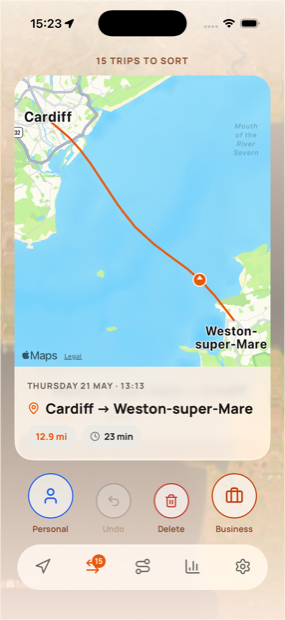
Recording drives is the easy half. The half that makes people give up on mileage logs is deciding, weeks later, which of them were work. Milesheet is built so that job takes seconds.
Swiping
Open the Classify tab. Each card is one drive, replaying its route on the map so you actually remember it.
- Swipe right for business
- Swipe left for personal
A coloured band confirms what you did, with an Undo if your thumb went the wrong way. The same swipes work on rows in the Trips tab.
Make it sort itself
This is the part worth doing once. Open Settings → Locations.
Under Spotted in your trips, Milesheet lists places you keep going, worked out from where your journeys start and end. Tag one and every future trip there arrives with the answer already suggested.
The tags are:
- Business — a client, a site, a supplier. Travel here is claimable.
- Personal — the gym, your mother's, the supermarket.
- Home and Workplace — see below, these two are special.
- Ignore — save the place with no opinion, so it stops being suggested.
Once two or more trips match a tagged place, an Auto-sort button appears at the top of the Classify tab and files them all at once.
Home and Workplace matter for tax
HMRC does not let you claim ordinary commuting — the regular run between home and a permanent workplace. It is the single most common way a mileage claim goes wrong.
Tag your house as Home and your regular office as Workplace, and Milesheet recognises those drives and keeps them out of your claim, with a note on the trip explaining why. They stay in your records; they just stop inflating a figure you would have to defend.
Do not tag a client site as Workplace. Travel to a temporary workplace is claimable, so those should be Business.
Clearing a backlog
Come back from a fortnight away and the deck can be long. Two shortcuts:
- Auto-sort handles everything that matches a tagged place.
- Long-press any trip in the Trips tab to enter selection mode, tick as many as you like, then file or delete them together.
Selection follows what is on screen, so filter to Unclassified first, tap All, then Business — a month of commuting, filed in three taps.
Fixing what recorded badly
Open a trip and you can trim a route that ran on after you parked, split two errands recorded as one, merge a drive broken by a petrol stop, or link an out-and-back so the pair reads as one round trip. None of it is one-way.