 Milesheet
Get your real MPG, and use it
Logging fill-ups, what the economy card is telling you, and how it makes every trip cost honest.
The MPG on your car's brochure is a laboratory figure. The one that matters is what your car returns on your roads, and you can only know it by measuring.
Logging a fill-up
Settings → Fuel & fill-ups, then the + button. You need three things:
- Litres and total cost — straight off the pump receipt.
- Odometer — the important one. Without it a fill-up counts towards spending but not towards economy.
- Full tank — leave this on if you filled it to the brim.
Milesheet drops a pin where you are and names the station for you, so you rarely have to type anything but the numbers.
What it works out
Real MPG needs two full tanks with odometer readings. That is not a limitation, it is how the measurement works: the distance between two brim-full fills, against the fuel it took to refill, is the only honest figure available.
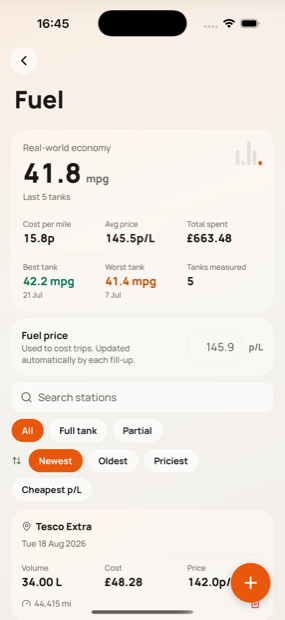
Once you have it, the economy card shows:
- Rolling MPG over the last five tanks, weighted by distance so a long motorway tank counts more than a short town one.
- A trend against your lifetime average, so you can see the winter dip or a dragging brake.
- Cost per mile, worked out as litres-per-mile times what you actually paid.
- Best and worst tank, with dates.
Partial fills are not wasted — their fuel is folded into the interval they belong to.
Why it matters beyond curiosity
Once Milesheet knows your real economy it prices every journey with it, rather than a stated figure. That shows up in three places:
- Trip detail — estimated fuel used and cost for that drive, and cost per mile.
- Passenger splits — what your passengers actually owe you for the fuel.
- The calculator — the net figure on a job, after fuel.
A trip's cost line says which basis it used, so you always know whether you are looking at a measured figure or a stated one.
The miles you forgot to log
Odometer readings do one more job: they are a check on your trip log.
If your odometer says 480 miles passed between two fill-ups and your trips only account for 350, then 130 miles went unrecorded — and unrecorded business miles cannot be claimed. Insights shows an Unlogged mileage card when it spots this, with an Add trip button that opens manual entry pre-filled with the distance and dated inside the gap.
It is deliberately quiet about small differences. Driveway shuffling and rounding are normal; a gap has to be both large enough and a real share of the distance before it says anything.