 Milesheet
Turn a year of driving into a claim
How the 45p and 25p bands work, what to export, and when to do it.
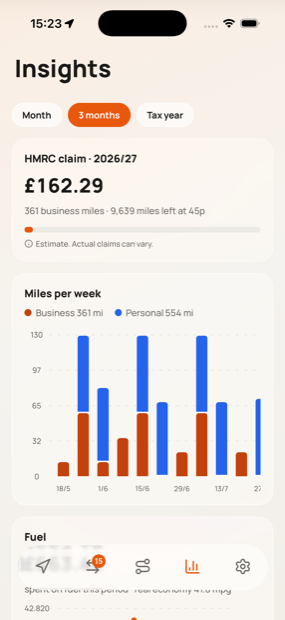
Milesheet keeps the claim up to date as you drive, so the January scramble becomes a five-minute export. This is what the numbers mean and what to send.
The two rates
HMRC's approved mileage rates for cars and vans are:
- 45p a mile for the first 10,000 business miles in a tax year
- 25p a mile after that
The threshold counts across all your vehicles, not per car, and the tax year runs 6 April to 5 April. Milesheet applies this as it goes, so a journey's value depends on when in the year you drove it. The same 200-mile job is worth £90 in April and £50 the following March.
Carrying colleagues on the same business trip adds 5p per passenger per mile, which is the most commonly missed part of a claim. Add passengers on the trip detail screen.
Check before you file
Open Insights and look at the tax-year card: business miles, the claim, and how close you are to the 10,000-mile line.
Two things worth checking before you export:
- Nothing left unclassified. The Classify tab tells you how many are waiting. An unsorted trip is in no total.
- Commuting is tagged. If you have not tagged Home and Workplace in Locations, your daily office run is probably counted as business. See sorting trips.
Then check Unlogged mileage on the same screen. If it shows anything, some driving never made it into the log.
What to export
Settings → Export & sync gives you three things worth having:
- Trip log CSV — every classified journey with dates, places, distance, rate band and claim value. This is the working document an accountant wants.
- Mileage claim PDF — the itemised, presentable version.
- Full backup (JSON) — not for your accountant, for you. It is the only way to move your history to a new phone.
Both the CSV and the PDF have a tax-year selector. Self-assessment for a year ending 5 April is filed by the following 31 January, so you will usually be exporting a year that has already finished — pick it rather than accepting the current one.
Monthly, if you invoice
Insights → Statements breaks the same data down by month, itemised with claim values and any parking, tolls or charges you attached. If you recharge mileage to clients, this is the per-month document to send.
You can also share a single journey as a PDF from its detail screen, which is what you want when somebody queries one line rather than the whole invoice.
Keeping it hands-off
Turn on auto-export and Milesheet writes always-current CSVs, plus a full backup, into iCloud Drive, a Files folder or your own NAS every time a trip finishes. Then there is nothing to remember in January at all.
Claim figures in Milesheet are estimates to help you keep a good record. They are not tax advice.